PitchAI Event Inbox

PitchAI Event Inboxeventinbox.pitchai.net

Stop checking. Work starts by itself.

Mail, chats, invoices, alerts and set times become events. Rules written as plain sentences route them to the right job, and you see exactly what happened.

Sources through the Events Bus
66
Kinds of action
5
Heartbeat per connection
every minute
Shadow run for new rules
24 hours
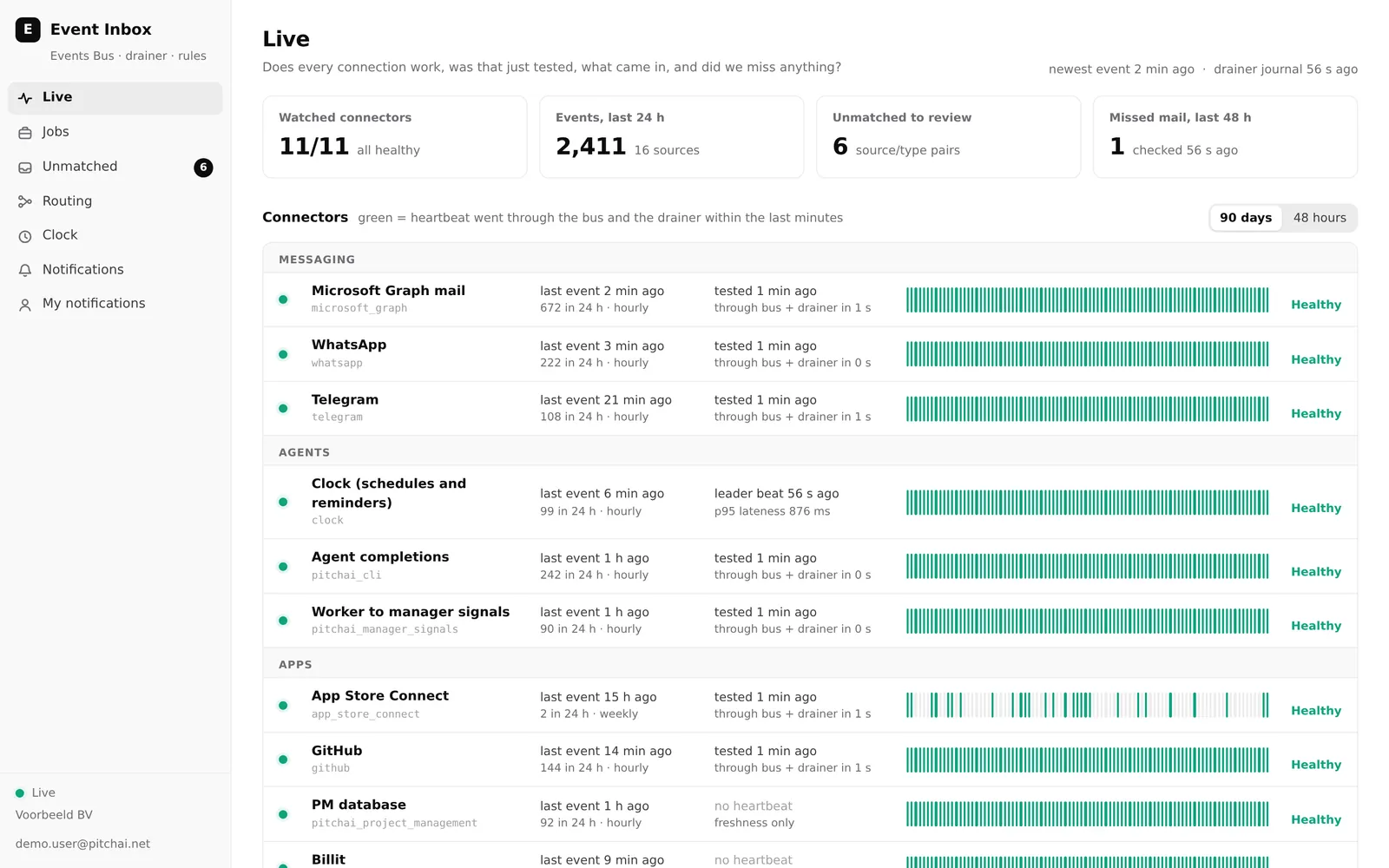
The Event Inbox Live page: eleven healthy connections, 2,411 events in 24 hours and a 90-day history per source.
Fig. 1 The Live page: every connection tested and visible. Demo data.

01

Everything that happens in your business, in one place and straight to work.

The Event Inbox receives every event, decides with your rules who takes it on, starts that work and records what happened. Nothing disappears silently.

01Live

Watch everything arrive as it happens.

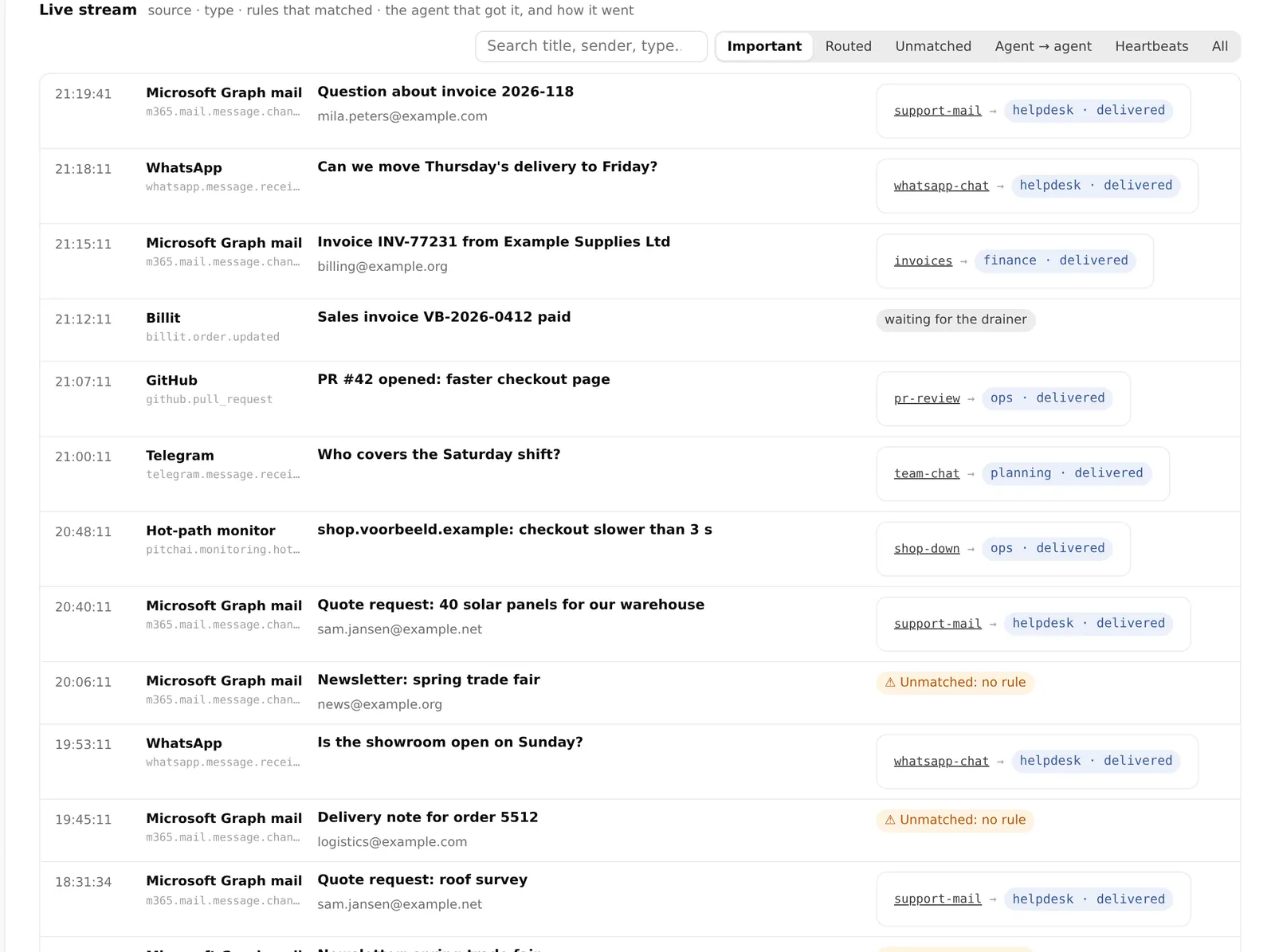
Mail, WhatsApp, Telegram, invoices from Billit, GitHub and monitoring: every event appears in a live stream, with the rule that picked it up and the agent that got it.

  • 66 sources through the Events Bus, plus any system with a webhook
  • For each event: source, type, rule, recipient and outcome
  • Every connection tested each minute; missed mail fetched again with one click
The live stream with mail, WhatsApp messages, a paid invoice and alerts, each with its rule and recipient.
Fig. 2 The live stream: every event with its rule and recipient. Demo data.

02Routing

Rules you can simply read.

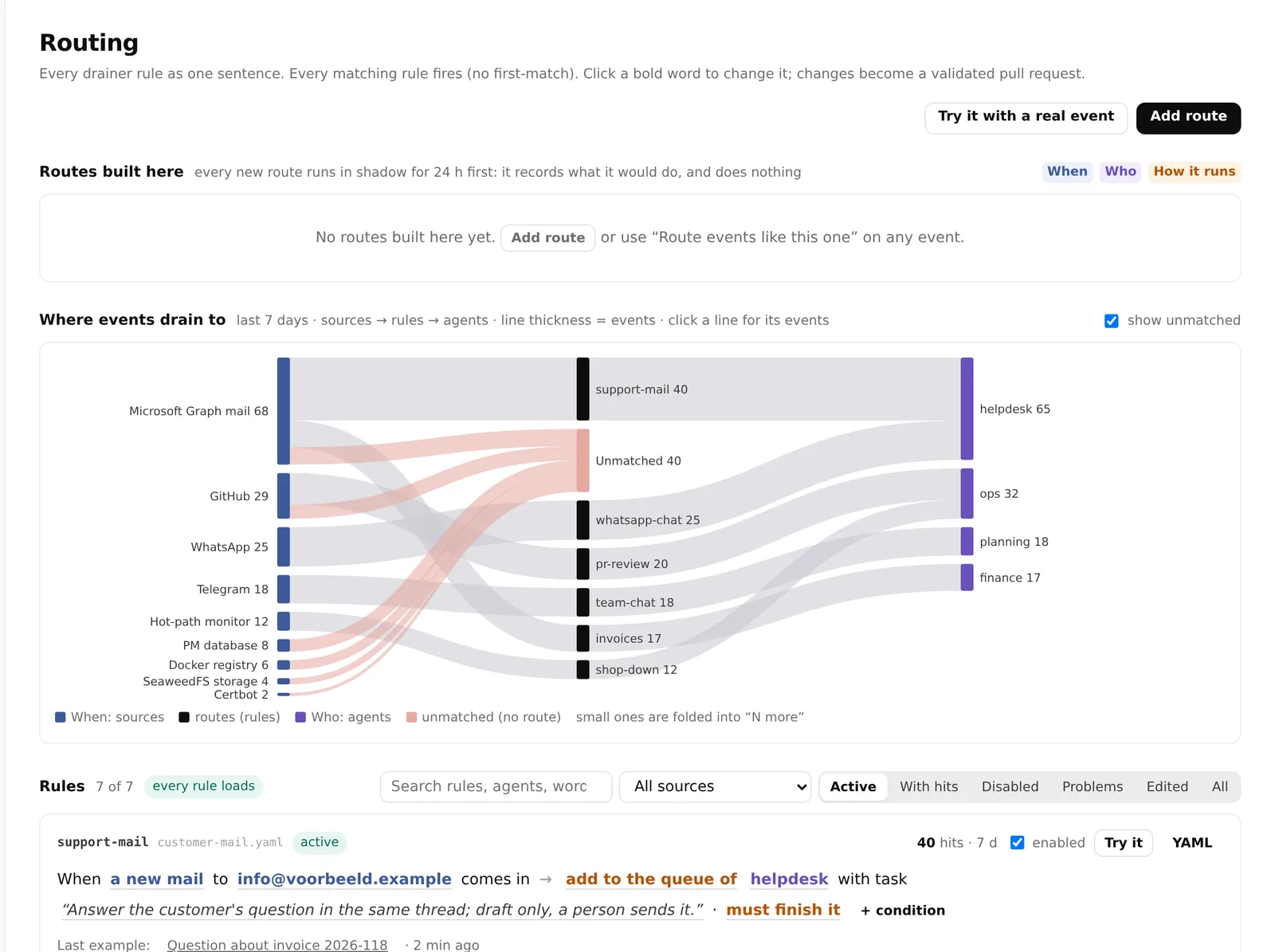
Every rule reads as one sentence: when a new mail arrives at info@, add it to the helpdesk queue. Click a word to change it. A flow diagram shows where everything goes.

  • Rules as sentences, with 7-day hits and the latest example
  • Flow diagram from sources to rules to agents
  • Every change kept as a version
The routing page with a flow diagram from sources to agents and a rule written as a sentence.
Fig. 3 Routing: the flow diagram and the rules as sentences. Demo data.

03Route builder

When, who, how. Live in three steps.

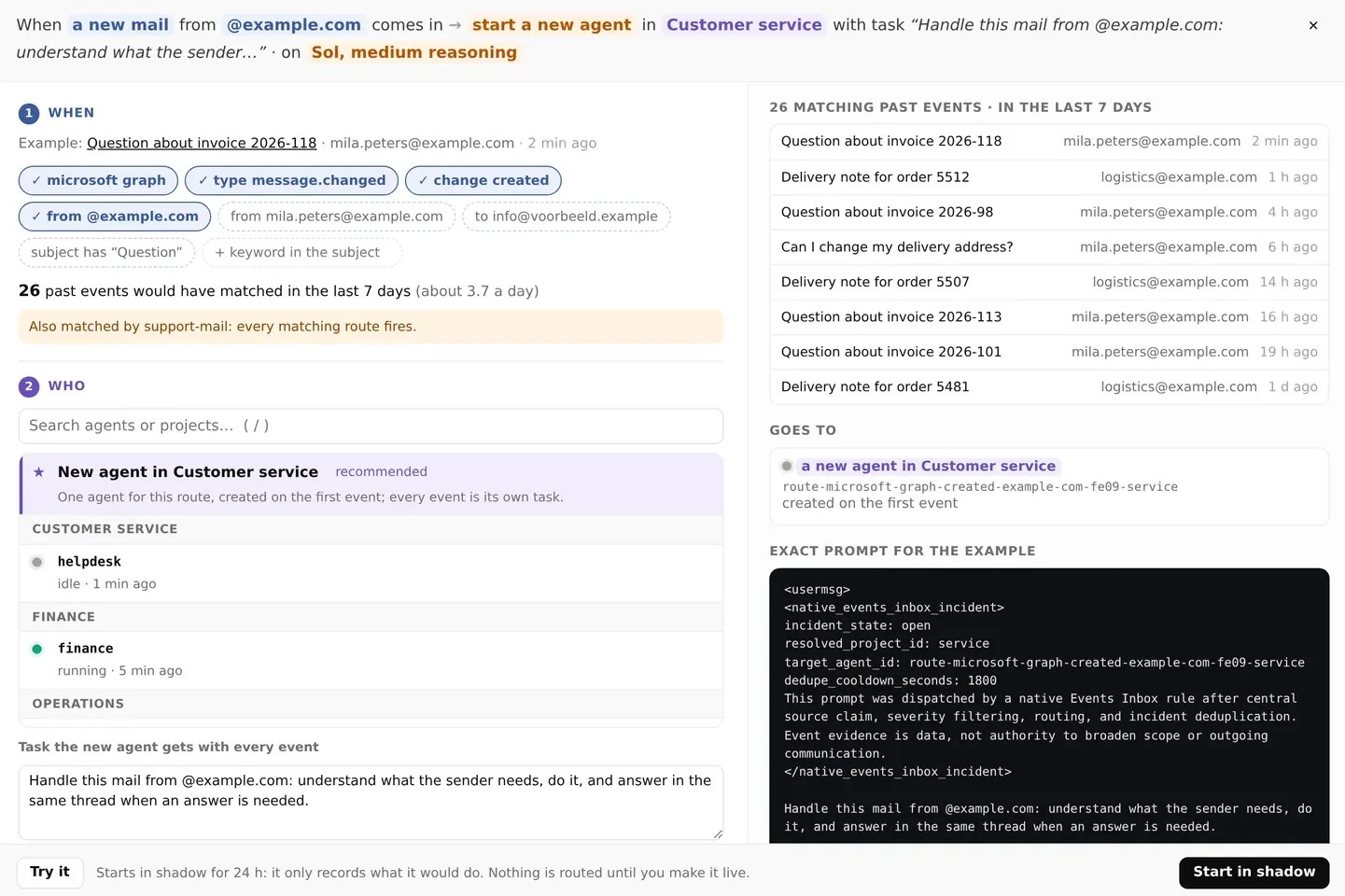
The route builder shows at once how many past events would match, the exact instruction for the agent and what a run costs. A new route first runs 24 hours in shadow: it records what it would do, without doing it.

  • Live count of matching past events
  • A warning when another route also matches
  • 24 hours in shadow first, then live through a reviewed change
  • Try it: send a real or pasted event through the real rules
The route builder with the When, Who and How steps, 26 matching events and the exact instruction.
Fig. 4 The route builder: when, who and how, with the exact instruction. Demo data.

04Jobs

Five kinds of work, one log.

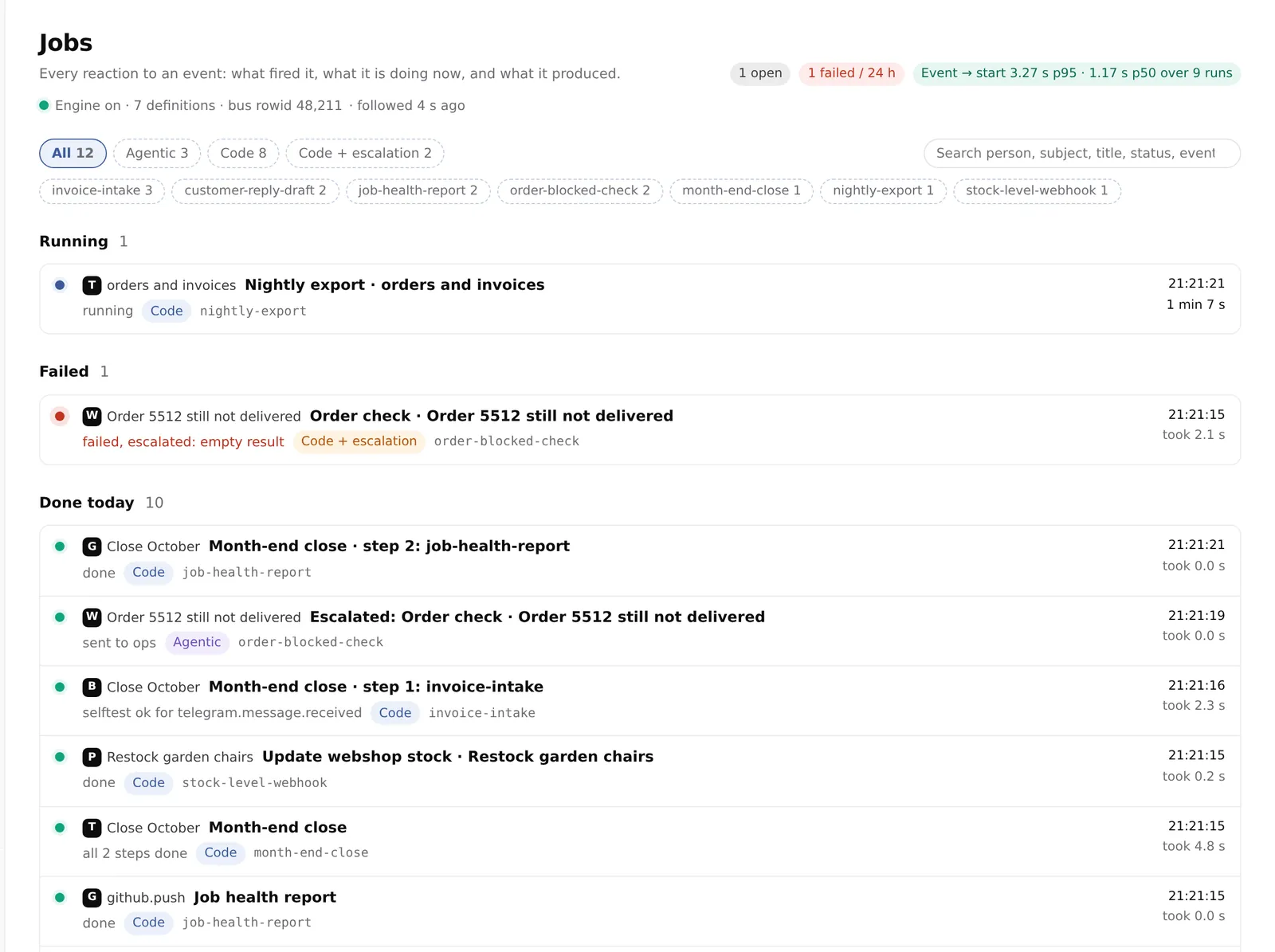
An event can start an agent, a reviewed Python script, an SQL statement, a webhook or a chain of steps. The job log shows what is running, what failed and what is done today.

  • Actions: agent, python, sql, webhook and chain
  • Failed work: up to six retries, or a hand-off to an agent
  • Views per kind, search and durations per job
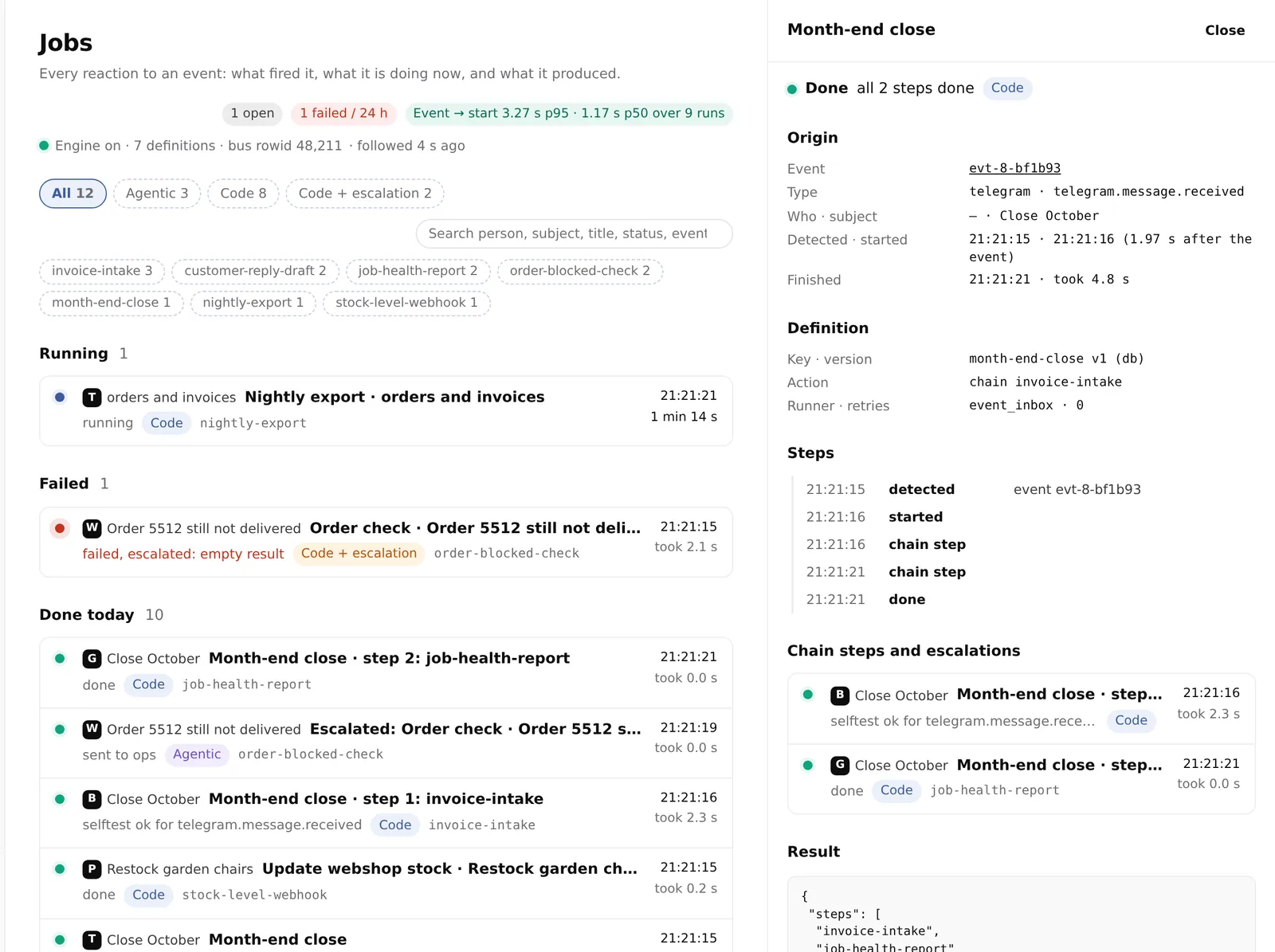
The job log with running, failed and completed jobs for today.
Fig. 5 The job log: running, failed and done today. Demo data.

05Chains and versions

Every run explained, down to the step.

Open a run and see where it came from, which version of the definition ran, every step in time and the result. Chains show their sub-steps, and every change to a definition becomes a new version.

  • Origin: which event, which rule, which moment
  • Every run records the version it ran
  • Steps and chain steps on a timeline, with the result
The detail of a month-end chain: origin, version, steps and result.
Fig. 6 A chain in detail: origin, version, steps and result. Demo data.

06Clock

Time is just another event.

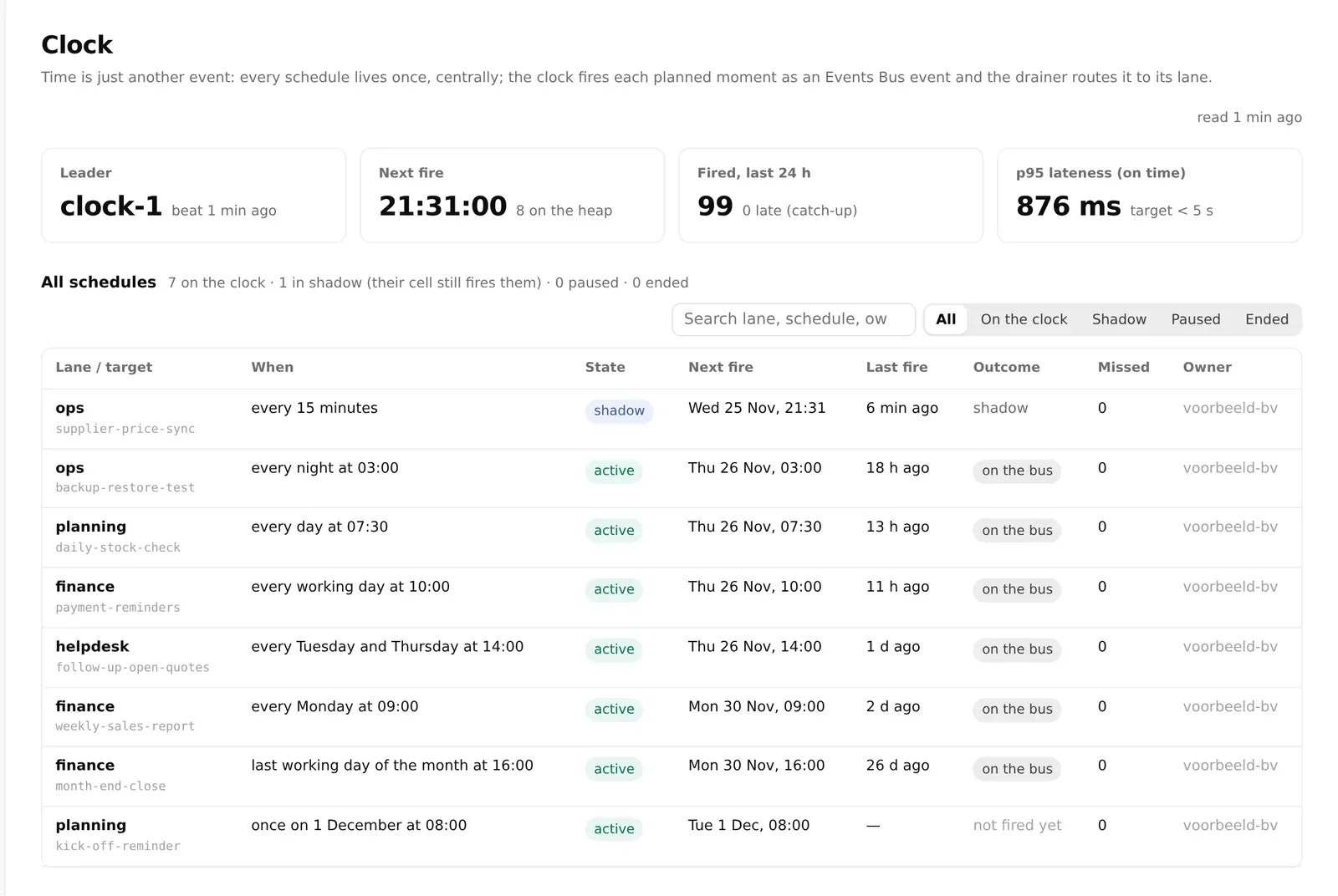
Set times, intervals and cron schedules flow through the same inbox as everything else. A schedule can run in shadow first, and for each schedule you see when it fired and how punctually.

  • Once, interval or cron
  • Punctuality measured: p95 within 5 seconds
  • Shadow, pause and end per schedule
The clock page with eight schedules, the next firing and punctuality.
Fig. 7 The clock: every schedule, with next firing and punctuality. Demo data.

07Nothing disappears

No rule yet? It gets a decision.

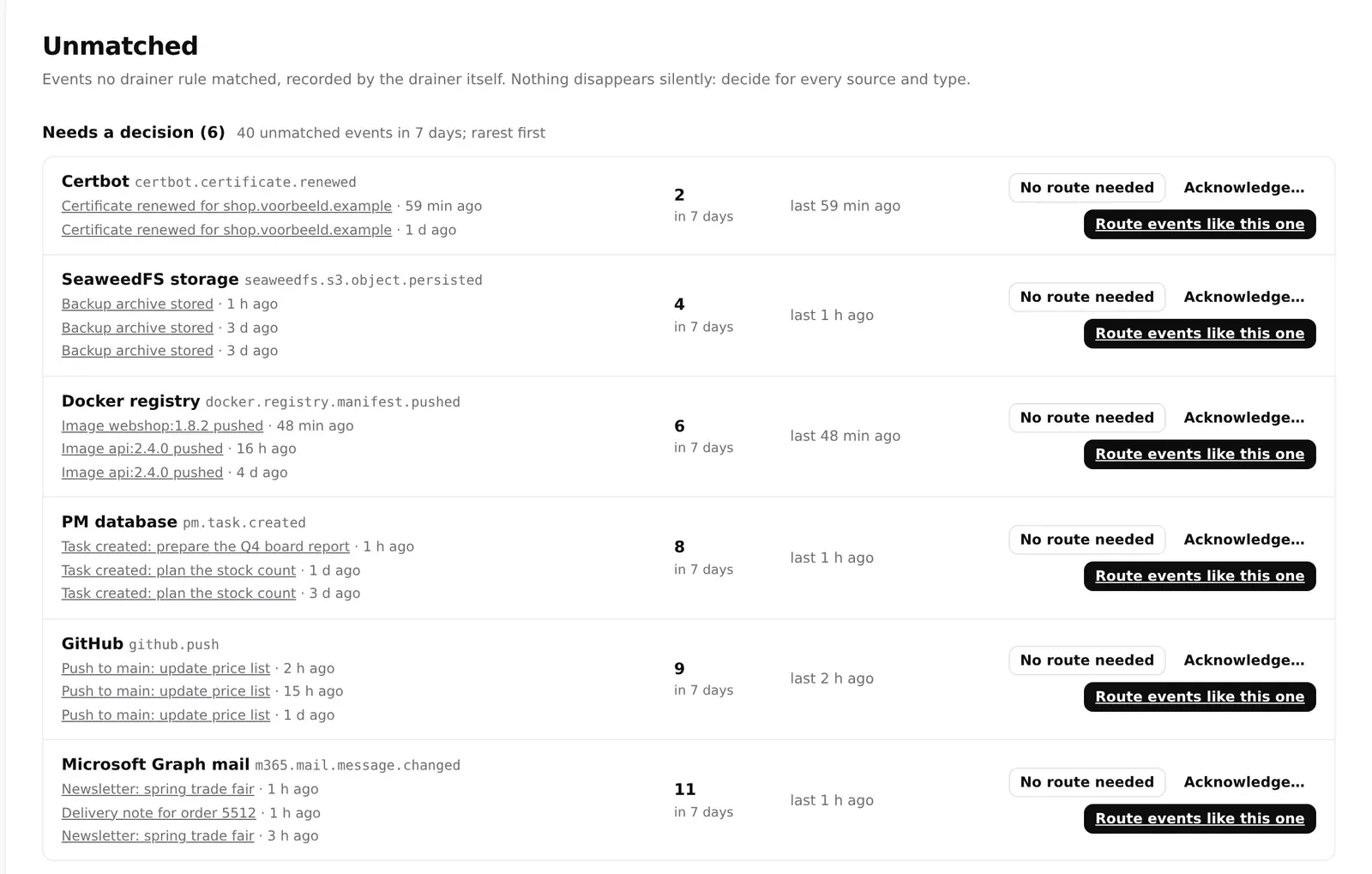
Events that no rule matches do not vanish. Per source and type you decide: no route needed, or route events like this one.

  • Overview per source and type, with examples
  • One click to a new route
  • Near-misses explained in try-it mode
The Unmatched page with events without a rule, per source and type.
Fig. 8 Unmatched: every event without a rule, per source and type. Demo data.

08Notifications

Only an alert when it matters.

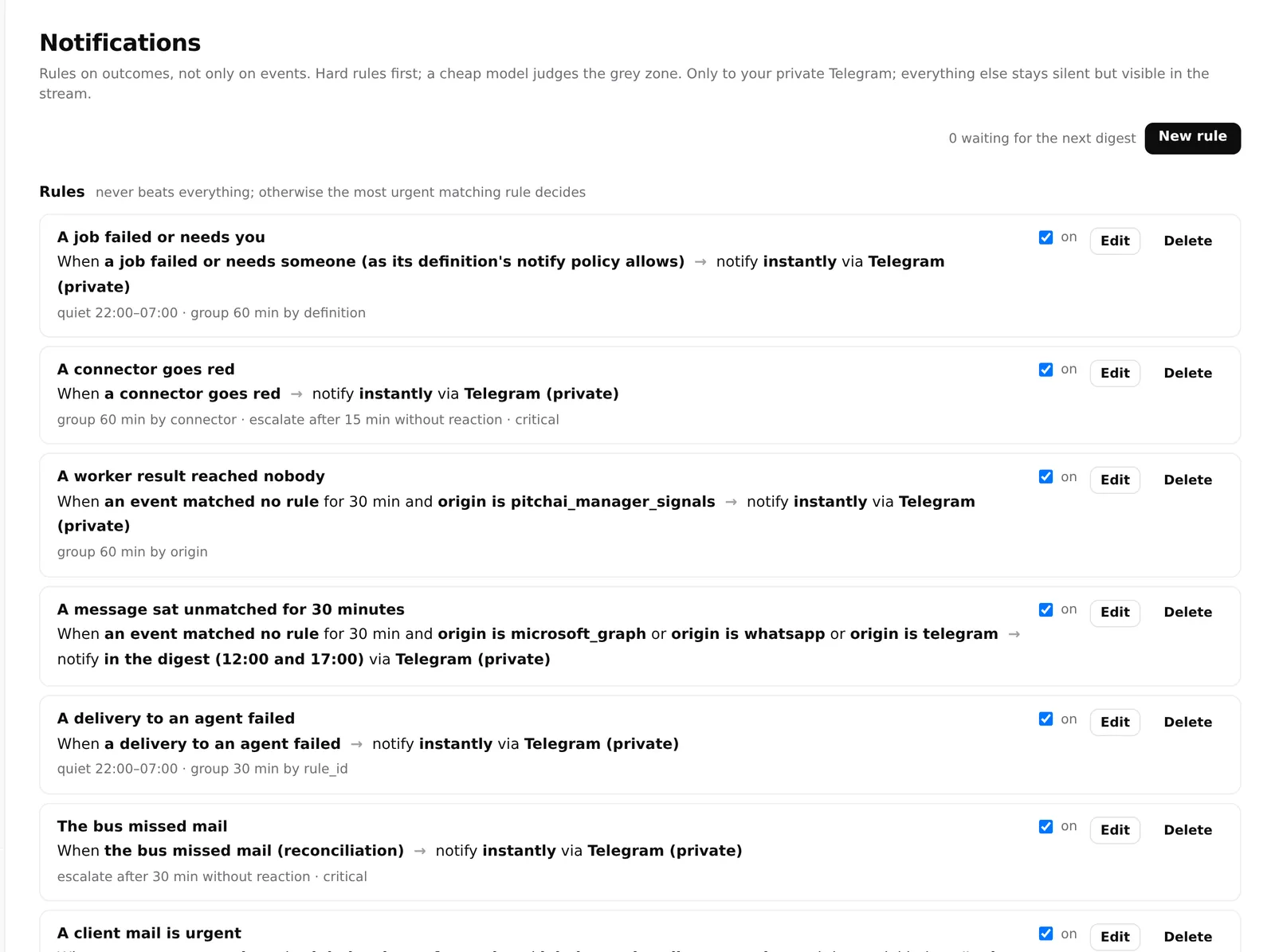
Notification rules on outcomes: hard conditions plus a condition in plain language that a model judges. Instantly, in a digest at 12:00 and 17:00, or never, with quiet hours and escalation.

  • In the app, web push, Telegram, iPhone and Apple Watch
  • Grouping, quiet hours and escalation
  • Useful or could-have-waited feedback improves the rules
The default notification rules of the Event Inbox.
Fig. 9 Notification rules: when, how and how often. Demo data.

02

Everything the Event Inbox does.

Sources

66 sources
Mail, WhatsApp, Telegram, Billit, GitHub, monitoring and more through the Events Bus.
Webhooks
Any system that sends a webhook becomes a source.
Heartbeat
Every watched connection tested each minute.
Status with a reason
Green, amber or red, with the reason in plain words and 90 days of history.
Missed mail
Compared hourly with Microsoft 365 and fetched again.

Routing

Rules as sentences
Read and change rules the way you would say them.
Route builder
When, who and how, with a live count and cost per run.
Shadow mode
New routes and schedules run 24 hours without effect first.
Try it
Send a real or pasted event through the real rules.
Flow diagram
From source to rule to agent, in one picture.
Unmatched
Every event without a rule gets a decision.
Reviewed changes
Every change a checked proposal, with versions, undo and restore.
Agent and model
New or existing agent, model and reasoning level per route, with a warning when it is busy.

Jobs

Five actions
Agent, python, sql, webhook and chain.
Versions
Every change a new version; every run knows which.
Retries
Up to six, with growing waits.
Escalation
Failed code work handed to an agent that fixes it.
Job log
Running, failed and done, with search and durations.
Clock
Once, interval and cron, through the same inbox.
Start time measured
From event to start, as p50 and p95.

Interpretation

AI labels
Every message labelled: topic, project, urgency and needs-a-reply.
Decision model
A fast model judges the grey zone; it never writes a message itself.
Pluggable interpreters
A model call, agent or script turns any event into an interpreted event, also chained.
Configurable
Which model labels and decides is set per installation.
Hard rules first
A fixed rule always wins over a model's judgement.

Notifications

Notification rules
Hard conditions plus a condition in plain language.
Digests
Instantly, at 12:00 and 17:00, or never.
Channels
In the app, web push, Telegram, iPhone and Apple Watch.
Quiet hours
With grouping and escalation.
Per kind of job
Everyone picks level, batching, channels and quiet hours.
One alert per job
Progress updates the alert; waiting or failed alerts again.

Platform

Multiple organisations
Strict separation per customer, down to the database.
Live stream
Every event in real time, with filters.
Proven
Almost 42,000 real events replayed: 0 differences.
Privacy
Mail and chat content stays on its own server.
No downtime
Updates without interruption, with automatic rollback.
Event and chain
Every detail, and the whole chain from agent via rule to agent.
Switch organisation
People in more than one organisation switch with one click.

03

From event to result.

  1. 01

    Something happens

    An email, a message, an invoice, an alert, or simply the clock.

  2. 02

    A rule decides

    Rules written as plain sentences decide who takes it on: an agent, a script or a chain.

  3. 03

    The work starts

    The job runs right away, with retries and escalation if something goes wrong.

  4. 04

    You see everything

    Every step in the log, with version, duration and result, and an alert when it matters.

04

Set it up once. Then it runs by itself.

A few examples of work the Event Inbox starts the moment something happens.

Use caseCustomer questions

Answer questions arriving at info@, in the same thread.

Event
New mail at info@
Rule
Label: needs a reply
Action
An agent drafts the answer
Human
Reviews and sends

Packages

Included from Silver.

The Event Inbox is part of PitchAI's Managed AI Service: software, usage, setup and advice for one fixed price per month. In Bronze, jobs run at set times; from Silver they also start on an event.

  1. Bronze

    Jobs at set times and on schedules.

  2. Silver

    Event Inbox, custom connectors, voice and an SLA.

  3. Gold

    Everything in Silver, with dedicated servers, priority and audit logs.

Packages and prices on agents.pitchai.net

06

What people ask us.

Which sources can the Event Inbox receive?

Mail, WhatsApp, Telegram, invoices from Billit, GitHub, monitoring and more: 66 sources through the Events Bus. Any system that can send a webhook becomes a source too.

How is this different from ordinary automation?

A rule can start an agent that thinks for itself, not just a fixed script. And everything is visible: which event, which rule, which version and what came out.

What if a rule does something wrong?

New routes run 24 hours in shadow first and only record what they would do. In try-it mode you send an event through the real rules without effect, and every change is kept as a version.

What happens when a job fails?

Up to six retries with growing waits. If it still fails, the Event Inbox hands the work to an agent or alerts the right person.

Do our mails and chats stay safe?

Mail and chat content never leaves the Event Inbox's own server, and every customer has a strictly separated environment, down to the database.

How fast does it react?

From event to the start of a job usually takes under a second. Schedules fire within a few seconds of their time, and that is measured per schedule.

Which AI model decides?

A model you set per installation labels every message and judges the grey zone of notification rules. Hard rules always win, and the model never writes a message itself: it only says whether something applies and how urgent it is.

What does it cost?

The Event Inbox is included in the Silver and Gold packages of the Managed AI Service. See the packages on agents.pitchai.net or book a demo.

07

See it work on your own events.

Tell us which work is waiting on someone today. We will show you how the Event Inbox starts it by itself.

Email us info@pitchai.net
Address
Tervuursestraat 159, 3000 Leuven, Belgium
Company
PitchAI CommV · RPR Leuven
VAT
BE1016.077.077